Tell it the change. Review every line.
Describe what you need in plain words, like you'd ask a colleague. Pilotello makes the change on a copy of your FactoryTalk Optix project, checks its work and shows you every line. Nothing is applied until you approve.
Get early access- No PLC connection.
- No production access.
- You approve every change.


… the HMI still has Optix's default look … Restyle the whole HMI, the window and all four screens (Overview, Schedule, BakeHistory, Alarms), to our design system …
Baseline validates clean. I'm snapshotting the original project so I can diff against it later, and checking which UI module definitions the validator can see.
I've restyled the window and all four screens to the design system, and the pack validator passes. Nothing has been opened in Studio or run in Runtime, so the actual on-screen rendering is still unchecked.
2 files restyled, 6 font files added, 78 of 78 bindings kept, model untouched
From Optix defaults to your design system
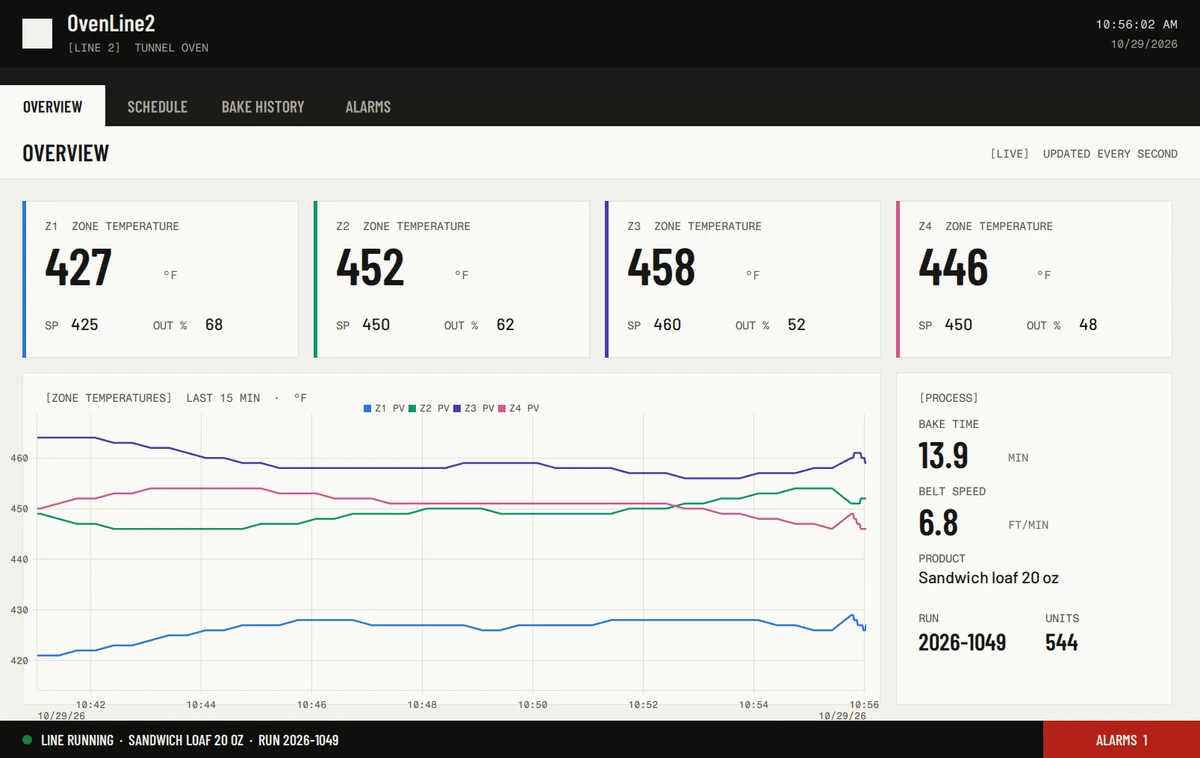
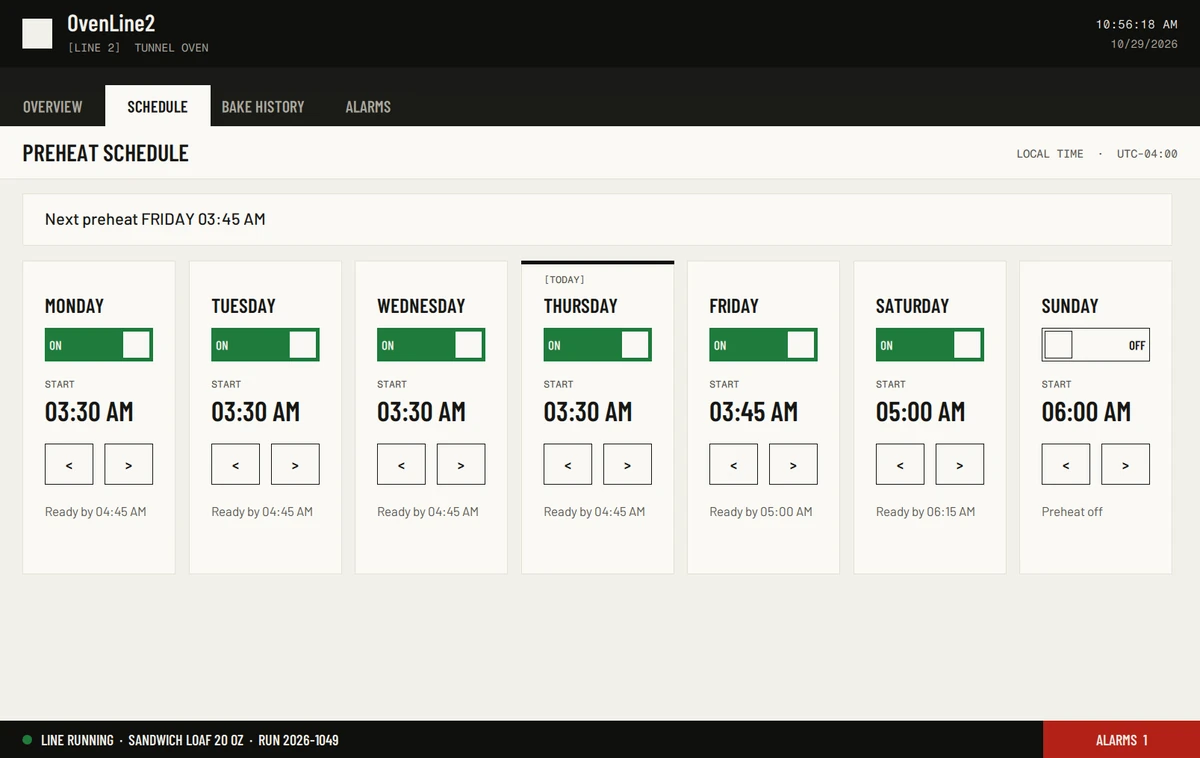
We gave Pilotello OvenLine2 with Optix's default look and a short design system: colours, fonts and components. It restyled the window and all four screens without touching the model, the logic or a single binding.
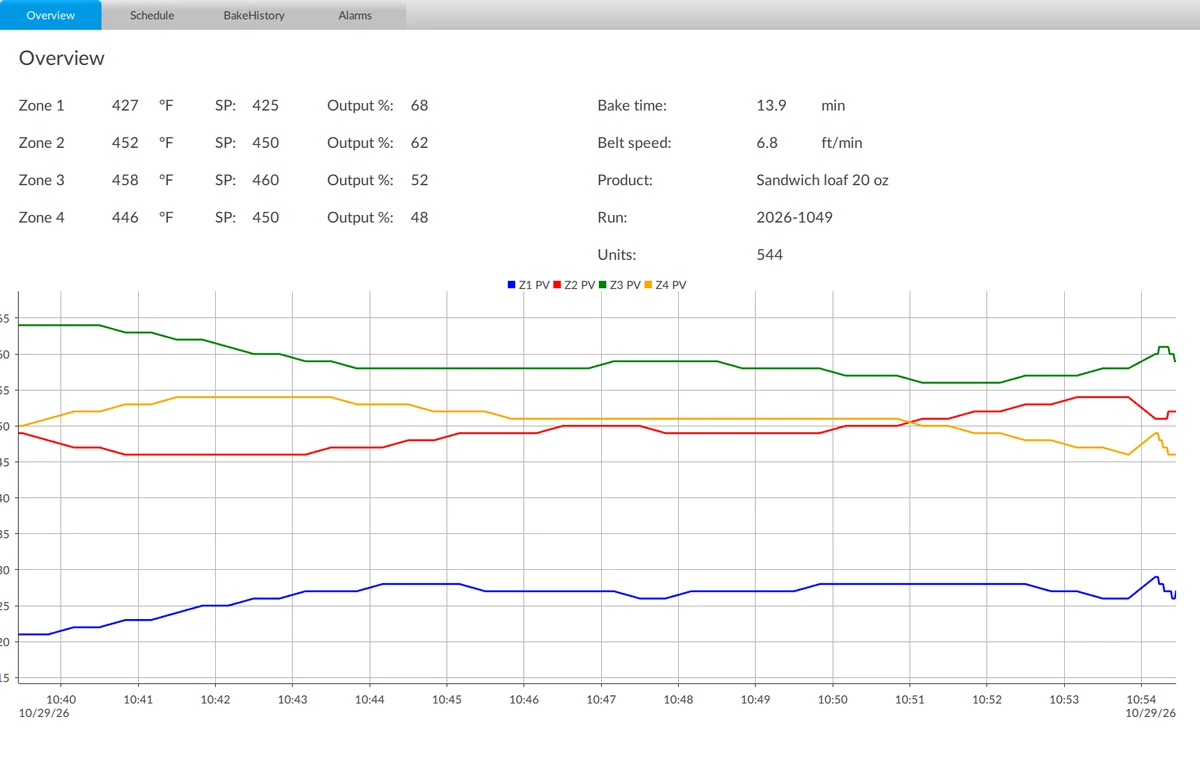
[A]Default widgets: values in rows, default tabs, default trend colours.
[B]Zone tiles with their series stripes, a process card, a header with the live clock and a status bar with the alarm button.
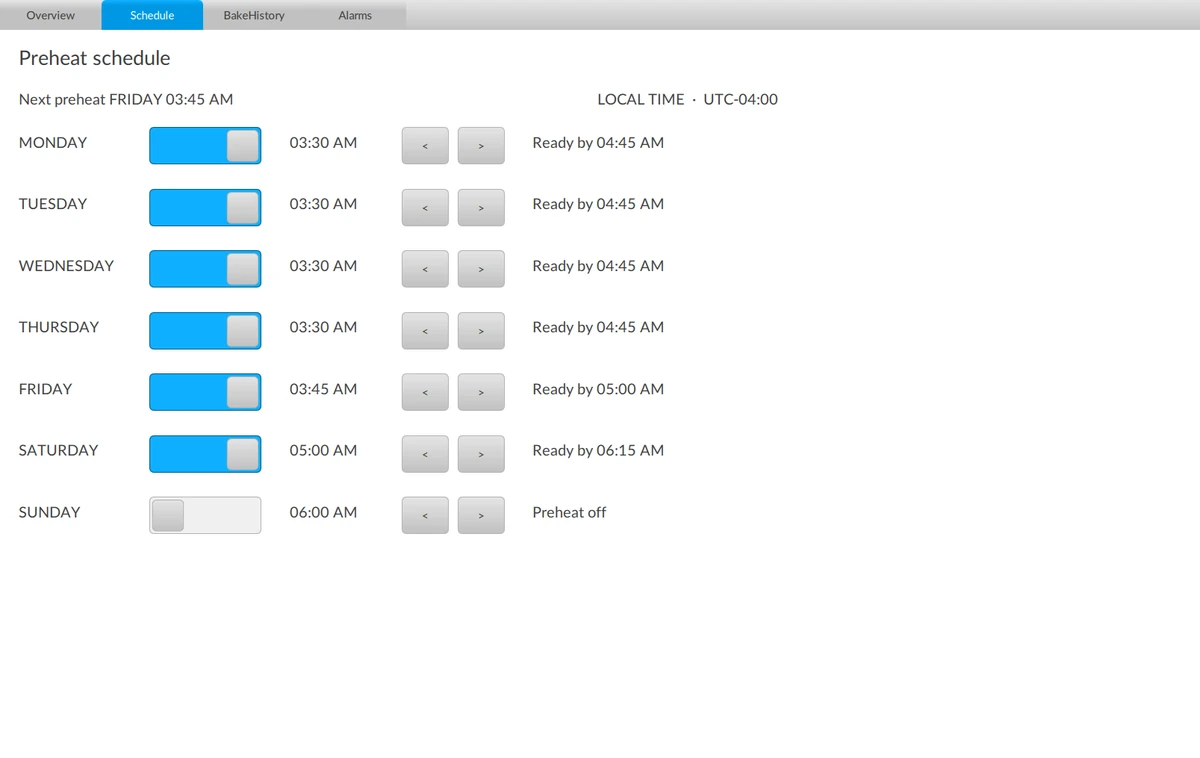
[A]Default switches and buttons in a plain list.
[B]One card per day with an ON/OFF switch, the start time large and a [TODAY] marker.
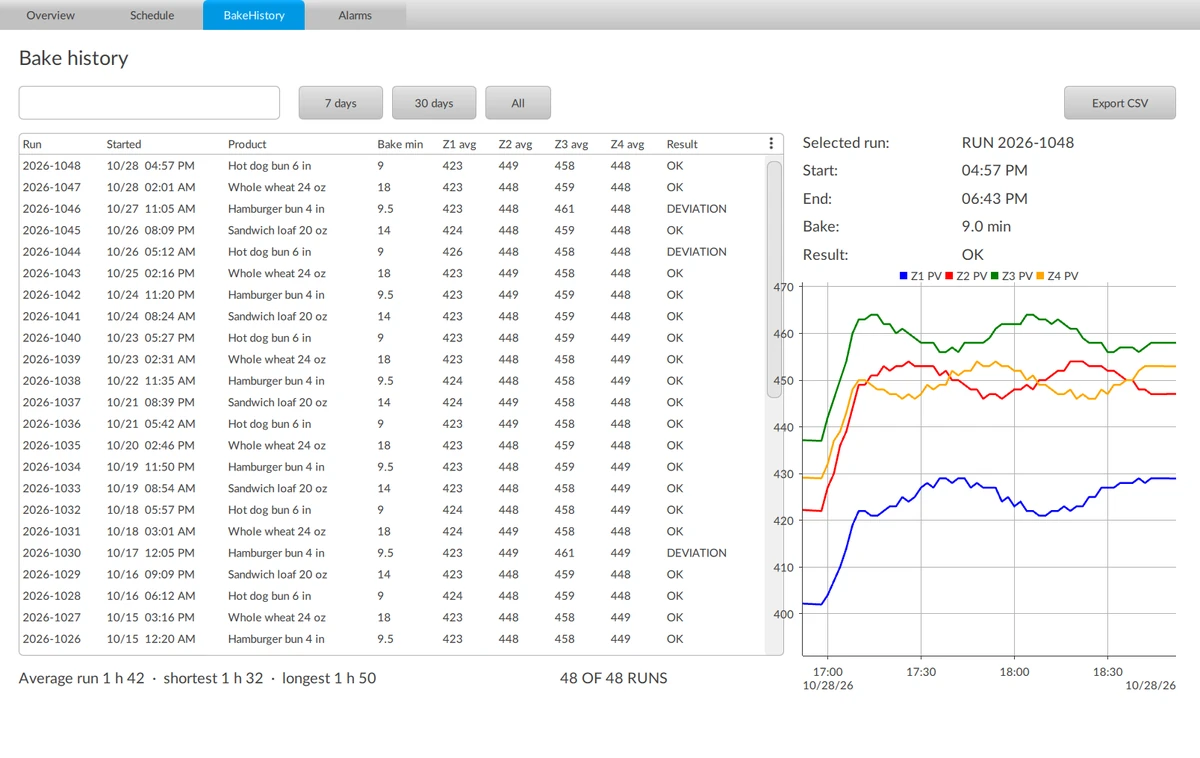
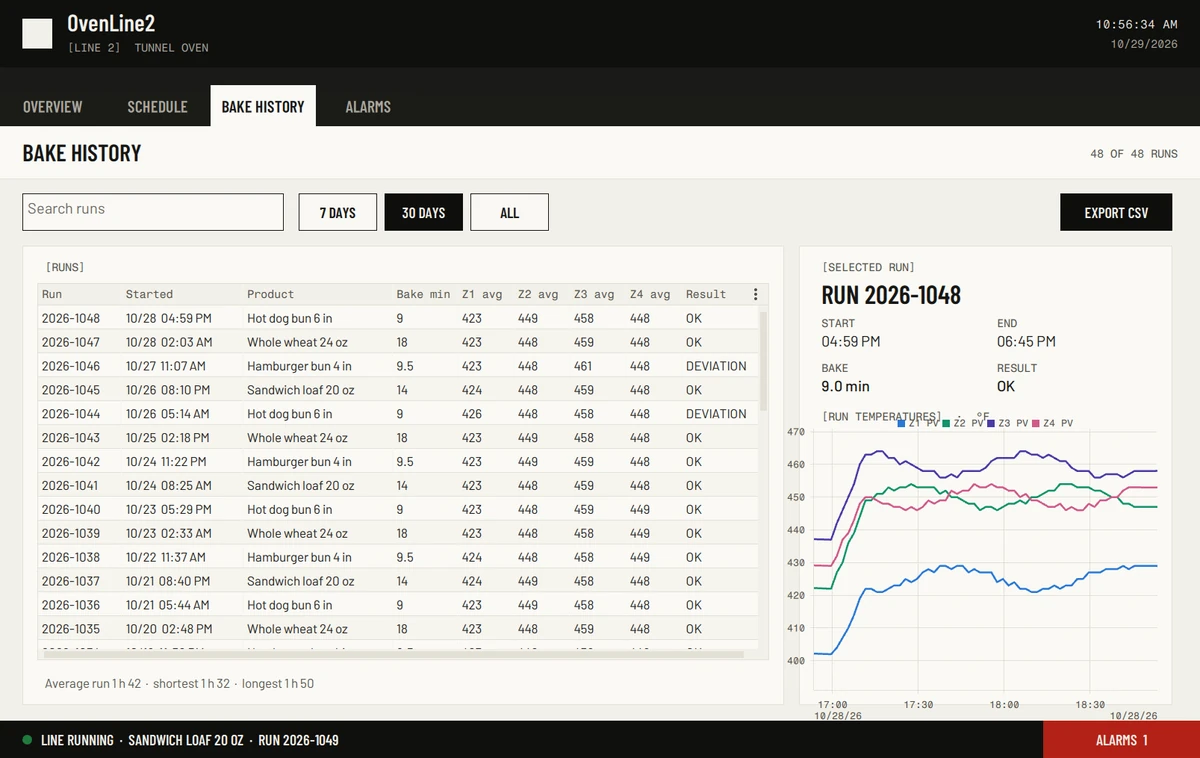
[A]Default grid, buttons and trend.
[B]Filter buttons, a styled run table and a selected-run card with its trend.
- 9 min 27 sagent time, 53 turns
- 78 of 78bindings kept
- 18 of 18button actions kept
- 95%of colours from the design system
- 3 of 3runs passed
I've restyled the window and all four screens to the design system, and the pack validator passes. Nothing has been opened in Studio or run in Runtime, so the actual on-screen rendering is still unchecked.
Our harness did: it exported the result and ran it in FactoryTalk Optix Runtime, where these screens were captured.
Captured in FactoryTalk Optix Runtime by our test harness on October 29, 2026: the default project, then the same project with the change from run 20261029-091900-restyle-design-system-pack. Nothing was retouched, so its flaws stay visible: the header shows the project name beside an empty logo box, and on Bake history the trend title overlaps its legend. Read the design system we gave it.
Zone 5, before and after
OvenLine2 is a public demo project: a bakery tunnel oven with five heating zones. Zone 5 was in the model but missing from the screens. We asked Pilotello to add it, in one paragraph.
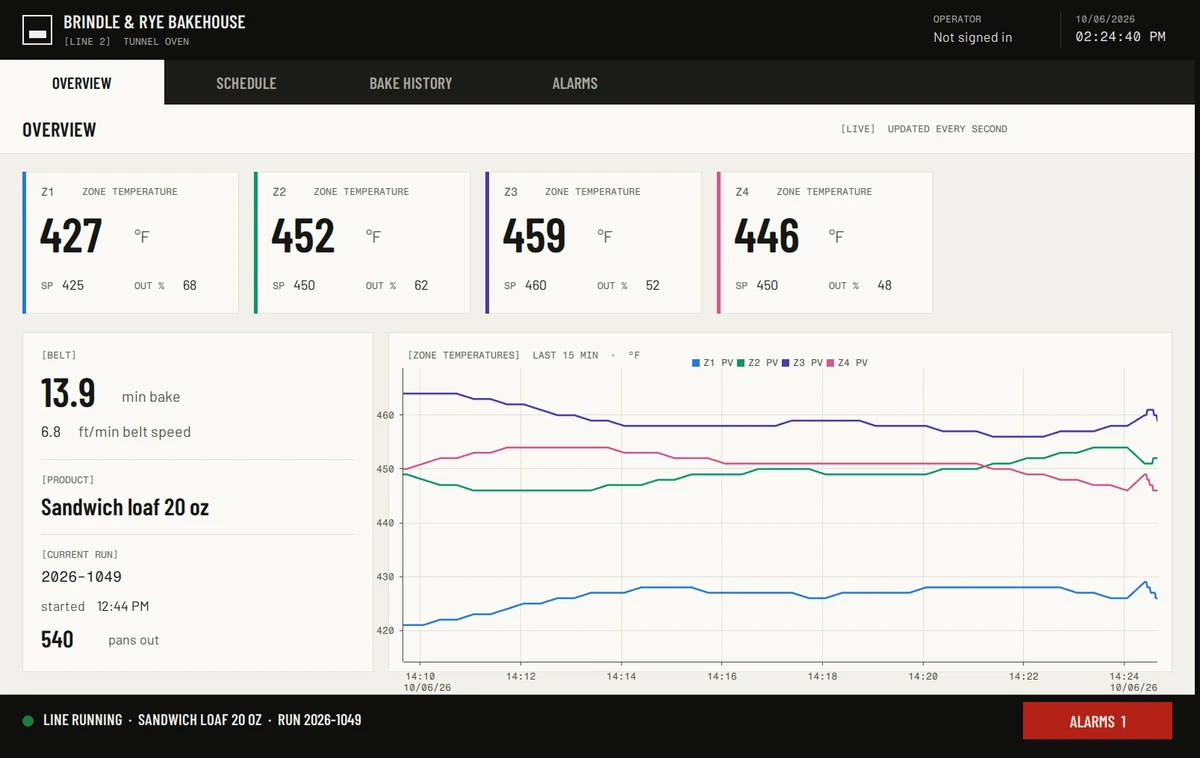
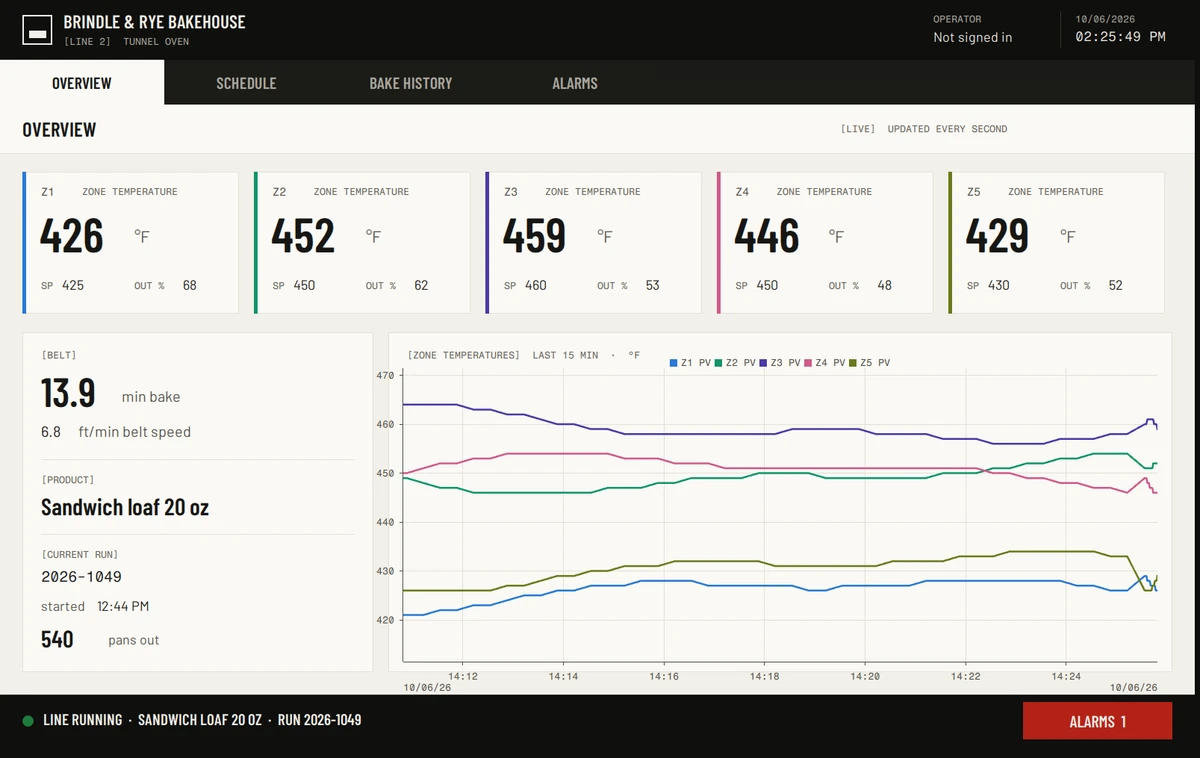
[A]Four zone tiles and four lines on the live trend. Zone 5 is running, but not on screen.
[B]A fifth tile for zone 5, in the next free slot, and a fifth line on the live trend.
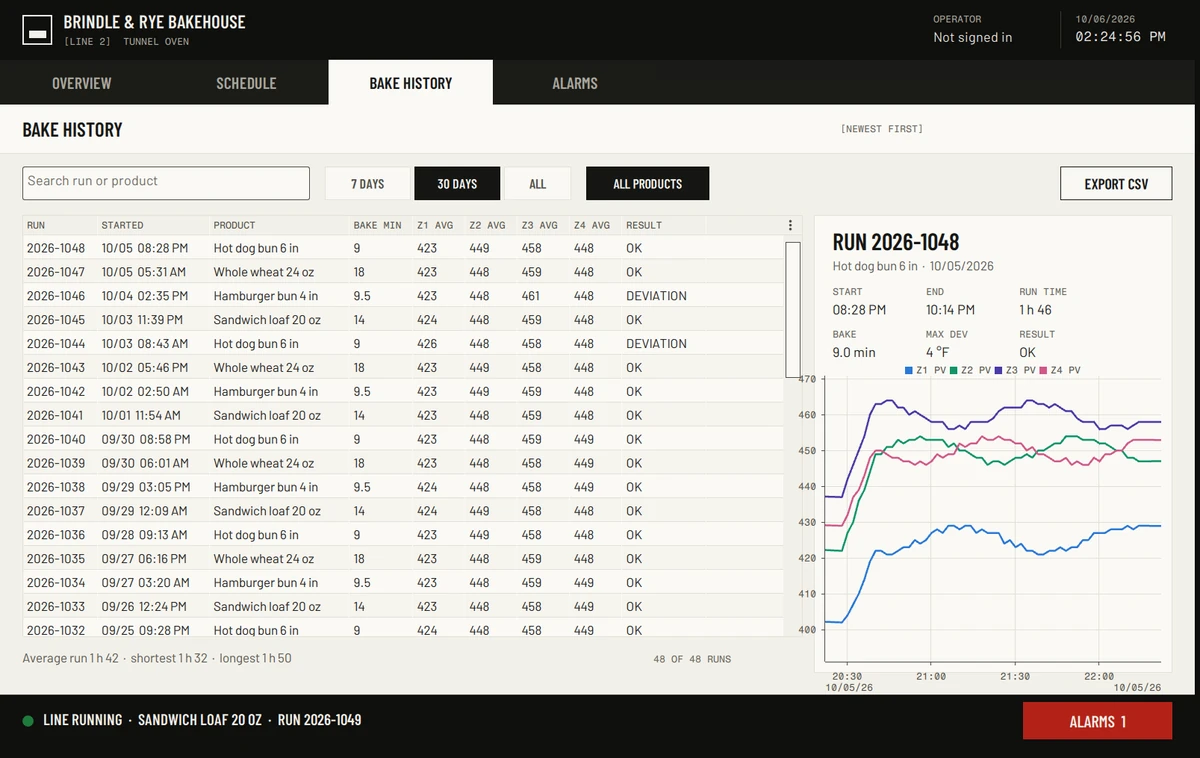
[A]Average temperatures for zones 1 to 4 only, and four lines on the run trend.
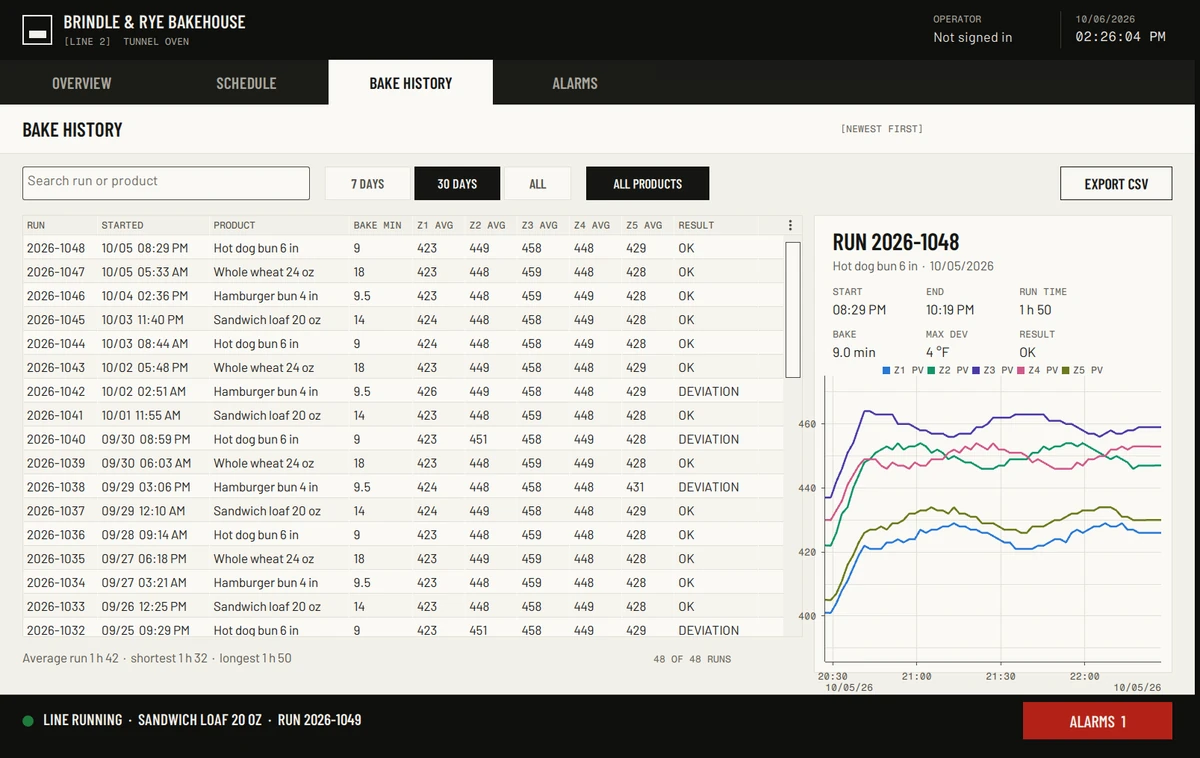
[B]A Z5 AVG column in the run list and a fifth line on the run trend.
Both screens were captured in FactoryTalk Optix Runtime by our test harness on October 6, 2026: first the untouched project, then the same project with the change from run 20261005-officiel-04. Nothing was retouched.
From a request to a reviewed change
Reads your project first
It finds how your project already does things before it proposes anything.
Overview tile: each zone is an instance of the project's ZoneTile type. Its Zone alias points at the model zone, and its colour stripe takes UI/Palette/SeriesN. The tiles sit 248 px apart.
Every source I needed already existed (Model/Oven/Zones/Z5 with PV, SP and Output, and Palette/Series5), so nothing had to be invented.
Works on a copy
It lists every file it will change. Your original project is never touched.
Nodes/DataStores/DataStores.yaml+9Three database columnsNodes/Loggers/Loggers.yaml+50Zone 5 temperature and setpoint, loggedNodes/UI/Screens/Screens.yaml+180Zone 5 tile, two trend lines, history columnProjectFiles/NetSolution/OvenZones.cs1 line editedZ5 added to the zone list
Checks its work
Automatic checks catch what breaks Optix projects: duplicate IDs, broken links, queries the database refuses, wrong method calls and edits outside the plan.
- No duplicate or malformed node IDsPASS
- Every link and alias points at a node that existsPASS
- UTF-8 without BOM, line endings keptPASS
- No database query the Optix store would refusePASS
- Every method call matches what the method declaresPASS
- Only the files in the plan changedPASS
- No certificates, secrets, drivers or new IP addresses touchedPASS
A search for Z5 now finds it in every place where Z1–Z4 appear.
You approve
You read the full diff, then approve it or send it back.
This is the only line in the whole diff that changed rather than being added.
- [01]Model: a tunnel oven, zones Z1 to Z5. Zone 5 is already there
- [02]History: the run adds Z5 to the logger, to two tables and to the zone list
- [03]Overview, 1280 × 800: tiles at x 24, 272, 520 and 768; the Z5 tile at x 1016, y 184; a fifth trend line
Nothing changes until you approve
Every change arrives as a diff you can read line by line, with the agent's own list of what it could not check.
Nodes/UI/Screens/Screens.yaml+180, additions onlyWhat this changes in recorded data: the two store tables each gain a column. On a runtime whose database already holds history, existing rows will have empty Z5 values. Also, the run-journal NetLogic only creates sample history when the database is empty, so on an existing database Z5 will only show values recorded from now on.
Still to check by hand: build the project in Studio, then run it and confirm the fifth tile, both trend pens and the "Z5 AVG" column render and update.
The agent tells you what it didn't check. For this run we checked both: our harness exported the result and ran it in FactoryTalk Optix Runtime (the screens above), and an engineer opened it in Studio and looked at the tile, both trend lines and the history column.
Check our work
The Zone 5 change on this page comes from one recorded run on a public project. Here is the rest of it: the full request, the numbers and every changed line.
In the FactoryTalk Optix 1.7.3 project in the folder OvenLine2, zone 5 of the tunnel oven has just been commissioned: the PLC, simulated here by the OvenSimulation NetLogic, already provides Model/Oven/Zones/Z5 with PV, SP and Output, but the HMI only shows zones 1 to 4. Add zone 5 to the HMI exactly the way zones 1 to 4 are shown, everywhere they appear. Start by analyzing how zones 1 to 4 are shown and state your plan, including every file you will change, before you write anything; follow the project's conventions (types, palette, layout). Constraints: do not change the model (OvenLine2/Nodes/Model/), the OvenSimulation NetLogic or anything under OvenLine2/Nodes/CommDrivers/; no new communication, driver or controller access; reuse the existing variables, and if something you need is missing, stop and report it instead of inventing it; do not modify or delete existing nodes, and keep every existing node Id and namespace. Validate your changes before you finish, then report the files you changed, how you validated them, and a summary of the diff.
- Project
- OvenLine2, public on GitHub (MIT licence)
- Run
- 20261005-officiel-04, October 5, 2026
- Model
- Claude Opus 5.5
- Agent time
- 1 min 53 s, 33 turns
- Change
- 4 files, 239 lines added, 1 line edited, nothing deleted
- Checks
- 7 of 7 pass, 0 errors, 0 warnings
- Built and run
- Exported, compiled and run in FactoryTalk Optix Runtime by our harness, 0 errors
- Repeated
- 3 official runs in a row (04, 05, 06) pass with the same diff
- Fingerprints
project 61346a956de5request b85419b467a8agent knowledge b7af4c1a39e7
Show the full diff4 files, +240 −1
Nodes/DataStores/DataStores.yaml+9, additions onlyNodes/Loggers/Loggers.yaml+50, additions onlyNodes/UI/Screens/Screens.yaml+180, additions onlyProjectFiles/NetSolution/OvenZones.cs1 line editedOpen OvenLine2 in FactoryTalk Optix Studio 1.7.3: zone 5 runs in the model but is missing from the screens. Apply the diff and it appears.
What leaves your machine
Your local scan stays in your browser.
When you request an AI change, you review the exact files or excerpts that will be securely processed before anything is sent.
Data sheet
Planned for launch. Anything not settled says so.- Stays in your browser
- The scan of your project folder: which files exist, how screens, types and links are organised.
- Sent for a change
- Only the files or excerpts you approve, listed with their size before anything is sent. You can remove any of them.
- Never sent
- Certificates and keys (
ProjectFiles/PKI,.pem,.key,.pfx,.p12),.envfiles and tokens, communication drivers (Nodes/CommDrivers, where PLC addresses live), workstation files (*.optix.design) and Runtime databases. - AI model
- Anthropic's API, under commercial terms.
- Training on your files
- To be confirmed
- How long files are kept
- To be confirmed
- Deleted after each job
- To be confirmed
- Not promised
- Zero retention without a contract. Validation of safety logic. Every Optix version.
FAQ
Does Pilotello connect to my PLC or my running HMI?
No. It never connects to a controller, a running HMI or your plant network. Pilotello works on a copy of your project files, and you deploy the result yourself, the way you do today.
What can I ask it to do?
Change an existing FactoryTalk Optix project. The jobs we prove in public are the ones on this page: add a new unit exactly like its siblings, on every screen, trend, log and history table where the others appear; and restyle an HMI to your design system, which is still experimental. Other kinds of changes will be marked experimental until they pass the same tests.
Which versions of FactoryTalk Optix does it support?
Our tests run on FactoryTalk Optix Studio 1.7.3. The supported versions will be listed before launch.
Do I need to install anything?
No. Pilotello will run in your browser. There is no desktop app and no plugin to install in Studio.
Does my project leave my machine?
Your local scan stays in your browser. When you ask for a change, you see the exact files or excerpts that will be sent before anything goes, and you can remove any of them. The data sheet lists what is never sent.
How much will it cost?
Prices will be announced before the limited launch. People on the early access list hear first. Joining the list is free and needs no credit card.
Who gets access first?
People on the early access list, in waves. You get one email when your access opens.
What won't it do?
Deploy to a PLC or an HMI, validate safety logic, or support every version of Optix. And it doesn't replace your review: you approve every change before it is applied.
Is Pilotello affiliated with Rockwell Automation?
No. Pilotello is an independent product. FactoryTalk and Optix are trademarks of Rockwell Automation, Inc.
Get early access
Emails about early access only. No sales calls.